

When to use subagents
- The job has distinct parts. Each part needs different tools or knowledge, such as one agent for your PMS and another for your vendor list.
- Parts can run in parallel. The lead agent can start several tasks at once and keep working while they run.
- You want to reuse an agent. A well-tuned “owner report” agent can serve several lead agents.
- The lead agent’s context is getting crowded. A subagent does its research separately and returns only the result.
Choose an agent’s subagents
1
Open the lead agent
Open the agent that should delegate, and select the Settings tab.
2
Add subagents
Under Subagents, search for the agents it can hand work to and turn on their switches.
3
Save
Select Save in the save bar.
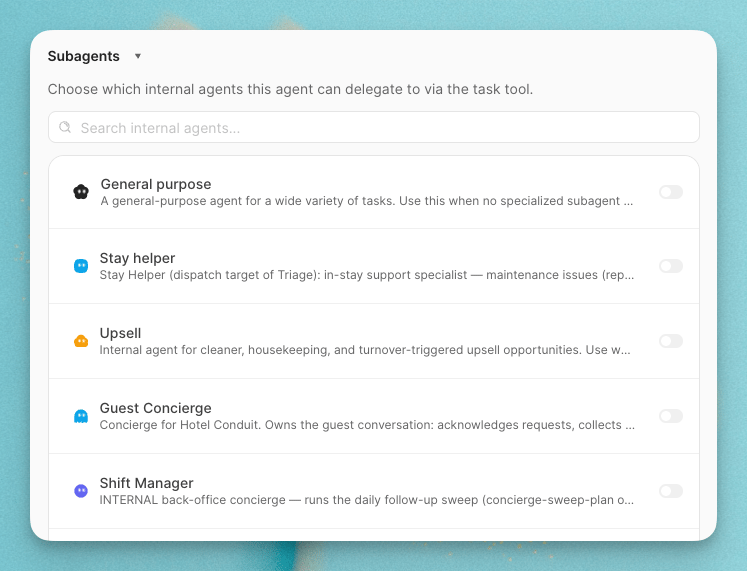
Both customer agents and internal agents can have subagents. Only internal agents can be subagents.
How delegation works
When the lead agent hands off a task, it writes the subagent a prompt describing what to do. The subagent runs with its own instructions, tools and Skills, then reports its result back to the lead agent.- A task can run while the lead agent waits, or in the background while the lead agent carries on.
- A subagent can ask the lead agent a question mid-task, then continue once it gets an answer.
- If a task fails, the lead agent can retry it or resume it with a follow-up.
- Background tasks can finish after the lead agent’s turn ends. When they do, the lead agent picks up their results and continues.
Things to keep in mind
- Subagents use their own tools. An internal agent working as a subagent can only do what its own Tools tab allows, not what the lead agent’s allows.
- Check the usage. Each task card shows how much work the subagent did, so you can spot tasks that are more expensive than expected.
- Deleted agents drop out. If you delete an agent, lead agents stop seeing it as a subagent.